
Today’s log is mostly me jotting down a few notes on how the operating system (OS) handles programs. The OS has a bunch of pretty fun concepts, and once you start digging in you find they’re actually kind of interesting.
OS - Operating System
Back in the day, when electronic devices were still simple, the concept of an operating system wasn’t widespread. If you asked someone what an operating system was, probably not many people would know. But in these modern times, as life demands more and more, complex electronic devices gradually showed up, and the widespread appearance of the OS became inevitable. By now a lot more people know about operating systems. Put simply, the OS was born to serve human needs. Complex electronic devices need an OS to manage them so that we can use them easily. No need to look far, there’s an operating system right in our pocket, it’s Android.
Some popular OSes everyone knows: Windows, MacOS, Linux, Android, IOS, …
Speaking of Android and IOS, that reminds me, these are the two most popular OSes on phones today. And us young folks love to drag these two out for comparison: this Android multitasks better than IOS, and IOS only runs one program at a time, when you minimize the running program and run another one, that minimized program just sits there frozen! So is any of this correct?
To clear this up we need to understand the concept of multitasking. And how the operating system actually works. Once you understand these things, you’ll naturally know whether those judgments hold up or not!
So what is multitasking? If you ask the kid at my house, they’d explain it like this: they can text their crush on Zalo while playing a game, open the Shopee app then open the FB app then open a bunch of other apps, and when they come back they can keep scrolling (without having to restart the program from the beginning), that’s multitasking. Basically that’s the simplest understanding and the most basic explanation. But that kid’s explanation relates more to the concept of multi-programming than to multitasking.
So let me explain what multitasking is, oh and along with multitasking comes the concept of mono-tasking, they’re a pair that goes together.
Mono-tasking (đơn nhiệm) and multi-tasking (đa nhiệm)
Mono-tasking: the concept where the operating system only allows one task (task/process) to run at a given moment. The system can’t run two or more tasks at the same time. This is the characteristic of ancient operating systems like MS-DOS.
Multi-tasking: the ability of the operating system to carry out many tasks simultaneously (or nearly simultaneously) by rapidly switching between tasks. The CPU works on each task for a very short stretch of time (usually measured in milliseconds), creating the feeling that gives us the “illusion” that many tasks are running at the same time. This is how modern operating systems like Windows, macOS, Linux work.
Uni-programming (đơn chương) and multi-programming (đa chương)
The “chương” here is the “chương” from the phrase “chương trình” (program), just so you know.
Uni-programming: when the operating system only allows one program to run at a given moment, with no switching between programs. It’s close to mono-tasking, but this concept focuses on the number of programs rather than tasks. Uni-programming relates to loading programs into RAM. You can think of it as the system not being able to load many programs into memory, so if you want to run another program, the only option is to shut down the current one.
Multiprogramming: the ability of the operating system to keep many programs in RAM at once and let the CPU switch between them when one program is waiting for a resource (for example, waiting for data from the hard disk). Multi-programming isn’t running many programs in parallel, it’s squeezing the most out of CPU resources by always having a program ready to run. For example: when program A is waiting for data from the disk, the CPU can switch over to run program B.
Reading up to here, uni-programming looks just like mono-tasking, and multi-tasking looks exactly like multi-programming, so what gives? Actually they differ in their level.
The difference between mono/multi-tasking and uni/multi-programming
Mono-tasking and multi-tasking focus on the number of tasks (tasks/processes) the operating system can carry out at the same moment.
Uni-programming and multi-programming talk about the number of programs the operating system can store and manage in memory.
Mono-tasking and uni-programming are fairly similar because if a program is already simple it usually has one task, and in both of these cases the operating system only carries out one task or loads a single program into RAM. The small difference is that mono-tasking focuses on carrying out the task, while uni-programming focuses on there being only one program in memory.
Similarly, multi-tasking and multi-programming have a bigger difference. Multi-tasking involves rapidly switching between the processes carrying out tasks to create the illusion of running at the same time, while multi-programming involves managing many programs in memory so the CPU doesn’t have to wait when one program stops to wait for a resource.
So the next question that comes up is, what’s the difference between a task and a program?
The difference between a task and a program
They differ in level, as I said above: one program can create many different tasks.
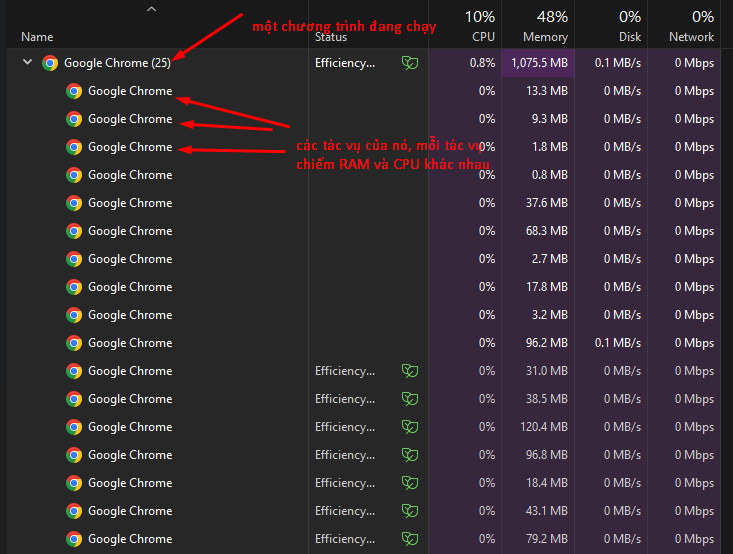
A program is a set of source code or an executable file, written in a programming language, and stored on the hard drive or in memory. It’s a static file and isn’t doing anything until it gets executed. For example: chrome.exe or Visual Code (installed)
When a program is executed, it becomes a task (also called a process). A task is a running instance of a program using resources like CPU, memory, etc. For example: when you click on the chrome.exe file, that program becomes a task running on the computer. At this point, the program is no longer a static file, it’s interacting with the operating system, memory, and other hardware resources.
Are there still any mono-tasking operating systems today?
My answer is yes, those OSes are usually inside simple devices like cash registers, POS machines at cafes or supermarkets, checkout scanners at supermarkets, or IOT devices and embedded devices.
The core of a mono-tasking OS is to serve simple things that don’t need to be too complicated.
How the CPU does multitasking
Above I said: “The CPU works on each task for a very short stretch of time (usually measured in milliseconds), creating the feeling that gives us the illusion that many tasks are running at the same time”. That means a CPU may really only process one instruction at a given moment, but it switches rapidly between tasks to create the feeling that all the tasks are happening at once.
There are several ways to do this across operating systems, here they are:
Time-sharing multitasking (Time-sharing)
This is the common method operating systems use to achieve multitasking. The CPU splits processing time into short slices (time slices) and switches between different processes after each of these stretches of time.
The switching process (the technical term people use is context switching) happens when the CPU moves from this task to another task. Each switch, the operating system has to save the current state of the task (the context) and load the context of the new task.
For example you’re cooking, the context is cooking, then you set it aside (save the current state), put on an apron and go wash the dishes, meaning you switch to the dishwashing context.
Or for example when you open a web browser, listen to music, and write a document at the same time, the CPU will switch between these three tasks continuously, each time for a very short stretch, creating the illusion that they’re running in parallel.
Priority-based multitasking (Priority-based)
With this kind of multitasking, each task can be assigned a different priority level. The OS will give more processing time to tasks with higher priority. This lets the CPU focus on important tasks while still handling less important ones at a lower level.
For example if you’re downloading some fairly large file and at the same time you’re working in a text editor, the OS can give processing priority to the editing, while the file download can go slower without interrupting your work.
Or for example in Windows when the machine freezes because the CPU is overloaded, if you try to open Task Manager, it will bump the priority of this Task Manager task up (inside Task Manager we can kill other programs).
Hyper-threading (Siêu phân luồng)
Some CPUs, like Intel’s line with Hyper-threading (the hyper-threading technology we often hear about), can create virtual processing threads. This lets one physical core of the CPU handle two processing threads at once. Although these aren’t two truly physical cores, it helps improve multitasking performance by optimizing CPU usage.
For example a 4-core CPU with hyper-threading technology can act as though it has 8 cores, because each physical core can handle two different threads at once. That’s why we hear the phrase 4 cores 8 threads.
Multi-core (Đa lõi)
A multi-core CPU has many physical processing cores on the same chip. This lets each core handle a separate task truly simultaneously, improving performance for multi-threaded applications.
For example when you run a game that demands heavy graphics processing and at the same time run other applications, an 8-core CPU can dedicate 4 cores to the game and the remaining 4 cores to the other tasks, handling them truly in parallel.
I/O tasks and the CPU
Multitasking doesn’t depend on the CPU alone. When a task needs to access an I/O device (like the hard drive, the network, …), the CPU can pause processing and switch to another task while waiting for data from the I/O device. This helps the system use CPU resources more efficiently.
For example when you copy a file from the hard drive to a USB stick, the CPU can switch to handling other tasks while the data copying is going on.
Types of CPU multitasking
Cooperative multitasking (Đa nhiệm hợp tác)
This is the form of multitasking where tasks have to voluntarily hand control of the CPU over to another task. If a task doesn’t yield the CPU, it can hog all the processing time.
Usually seen in ancient OSes like the early Windows versions, they used this style of multitasking, where applications decide for themselves when to stop so another application can get processed =)))
Preemptive multitasking (Đa nhiệm ưu tiên)
In this form of multitasking, the OS decides when the CPU will move from this task to another task. This guarantees that no task hogs the CPU for too long.
Modern OSes today like Windows, Linux, and macOS use this style of multitasking to guarantee that every task gets a chance to be processed, because if you play it like the first guy, you run into a badly behaved task and it just takes the whole thing =))))
Bonus
Quite a while back I wrote the post How do concurrent and parallel processing differ across programming languages? the two of them are related to each other.